Resetare & Actualizare BIOS București – Update UEFI Firmware

Q-Flash / EZ Flash safe procedure + UPS protected + Optimizare setări

🔒 UPS protected
Checksum verified
⚙️ Settings optimized
Resetare actualizare BIOS București - update UEFI firmware safe MIRO Soft profesional

Ce Include Serviciul Update BIOS / Resetare CMOS

🔍

Verificare Versiune Current

Enter BIOS (DEL/F2 key boot), identify version current (ex: F10, 1.20, AGESA 1.0.0.7), note date release.

🌐

Download Latest Stable

Site producător motherboard → Support → BIOS downloads, identificare latest STABLE (avoid Beta risky!), verify checksum MD5/SHA256.

💾

Prepare USB Flash

Format USB FAT32 (BIOS compatibility universal), extract BIOS file root directory (ex: B550F10.bin), label clear "BIOS_UPDATE".

🔋

UPS Backup Power

Connect PC la UPS (Uninterruptible Power Supply) = guaranteed power 10-15 min = eliminate risc power loss mid-flash = brick prevention!

Flash BIOS Procedure

Enter BIOS → Q-Flash (Gigabyte) sau EZ Flash (ASUS) sau M-Flash (MSI), select file USB, confirm update, WAIT 3-8 min = CRITICAL nu întrerupe!

🔄

Auto-Reboot POST

Flash complete → System reboot automatic (poate 2-3 reboots training RAM), verify POST successful, enter BIOS verify version nou displayed.

⚙️

Optimizare Settings

Enable XMP/DOCP RAM overclock, TPM 2.0 (Windows 11), Secure Boot, disable CSM legacy, adjust fan curves (silent/performance), save profile.

Boot Windows Test

Boot Windows verify normal (zero errors), check Device Manager hardware detected, run stability test 15 min (CPU-Z stress, HWiNFO64 monitor).

De Ce Update BIOS?

🆕

New CPU Support

Motherboard B550 original BIOS supports Ryzen 5000, update necesară Ryzen 7000 G-series compatibility (AGESA update microcode).

🐛

Bug Fixes Critical

BIOS bugs cause: random BSODs, RAM instability (training fails), boot loops, USB disconnects — update patches issues documented.

🔒

Security Patches

Vulnerabilities hardware-level (Spectre, Meltdown variants) fixed microcode updates = protection exploits critical.

Performance Gains

AGESA updates improve RAM overclocking stability (FCLK 1900+ MHz achievable), memory training faster (boot time -5-10 sec).

🪟

Windows 11 Compatibility

TPM 2.0 + Secure Boot enable BIOS settings = Windows 11 install unblocked (requirement mandatory Microsoft).

🎮

New Features

Resizable BAR (GPU performance +5-15% games), Smart Access Memory (AMD), PCIe 4.0 bifurcation support (M.2 adapters).

⚠️ Când NU Trebuie Update BIOS?

❌ Regula de Aur: "If It Ain't Broke, Don't Fix It!"

NU update BIOS dacă sistemul funcționează perfect stable!

Raționament:
• Update BIOS = risc inherent (power loss mid-flash = brick motherboard = 500-1500 RON replacement!)
• BIOS updates poate introduce bugs noi (regression issues documented forums) = stability worse vs previous version
• Manufacturers release BIOS versions rushed (Beta quality labeled "stable") = reports crashes/instability frequent primele 2-4 săptămâni post-release

Update BIOS DOAR când:
1. New CPU compatibility necesară: Upgrade Ryzen 3600 → Ryzen 5800X3D requires BIOS update AGESA 1.2.0.7+, altfel CPU nu recunoscut POST = no boot!
2. Critical bug documented afectează-te: Example: "RAM won't train above 3200 MHz" issue fixed BIOS F12 → update justified dacă experimentezi exact acest bug
3. Security vulnerability critical: Exploits public disclosed (ex: Zenbleed AMD) = patch urgență Microsoft/AMD released → update recommended preventive
4. Windows 11 install blocked TPM: Motherboard are TPM 2.0 hardware DAR disabled BIOS = update enables option activate = Windows 11 install possible
5. Feature nouă specific necesită: Resizable BAR (ReBAR) support gaming performance boost = update BIOS adds option (wasn't present older versions)

NU update BIOS pentru:
• "Just because there's a new version" = curiosity NOT valid reason (risc vs reward unfavorable!)
• "Maybe it will be faster" = placebo, performance gains BIOS updates minimal 1-3% typical (except specific AGESA memory improvements)
• "I'm bored" = entertainer yourself altceva, NOT risky hardware operations!

Check release notes ÎNAINTE decide update:
• Manufacturer support page BIOS download → "Release Notes" sau "Change Log" section
• Read improvements listed: "Fixed memory training issue Z690 boards" = relevant?, "Added support 14th Gen CPUs" = relevant dacă plănuiesc upgrade, "Improved system stability" = vague (could mean anything or nothing!)
• Forums/Reddit search "[Motherboard model] BIOS [version]" = community feedback (users report issues sau success?) = research 30 min ÎNAINTE flash = smart decision!

✅ Când Update BIOS Justified (Safe + Beneficial)

Scenario 1 - CPU Upgrade (Compatibility Mandatory):
• Motherboard: ASUS B550-F, BIOS current F10 (2021 release)
• CPU upgrade plan: Ryzen 5 3600 → Ryzen 7 5800X3D
• Check ASUS support CPU compatibility list: Ryzen 7 5800X3D requires BIOS F13+ (AGESA 1.2.0.7)
• Action: Update F10 → F13 MANDATORY (altfel CPU nou no POST = wasted purchase!)
• Result: Update success, 5800X3D recognized, gaming FPS +40%

Scenario 2 - Documented Bug Affects You:
• Issue: RAM DDR4 3600 MHz CL16 kit (XMP profile) = training fails BIOS, boots ONLY 2133 MHz default JEDEC = performance loss -30%
• Forums research: Multiple users report identical issue ASUS boards BIOS F11, fixed F12 release notes "Improved DDR4 memory compatibility"
• Action: Update F11 → F12 targeted bug fix
• Result: XMP profile stable 3600 MHz, zero training errors, performance restored

Scenario 3 - Windows 11 Blocked (TPM Required):
• PC Health Check tool: "This PC can't run Windows 11" error = TPM 2.0 not enabled
• Reality: Motherboard HAS TPM 2.0 hardware (fTPM AMD Platform Security Processor) DAR BIOS setting missing/disabled older firmware
• Action: Update BIOS latest → Advanced settings → AMD fTPM enable → Secure Boot enable
• Result: Windows 11 install proceeds successful, features modern OS (DirectStorage, Auto HDR gaming)

Scenario 4 - Security Patch Critical:
• AMD Zenbleed vulnerability disclosed July 2023 = register corruption speculative execution = potential data leaks
• AMD releases AGESA microcode patch = motherboard manufacturers distribute BIOS updates
• Action: Update BIOS patch Zenbleed (check release notes "Addresses AMD security advisory")
• Result: Vulnerability mitigated, system secure, peace of mind

Verdict: Update BIOS = justified când specific problem solved SAU feature necessary enabled. Otherwise = risc unjustified!

🔄 Clear CMOS (Resetare BIOS Setări)

Când necesită Clear CMOS?

1. PC nu pornește după overclock failed:
• Scenario: Overclock RAM 3200 MHz → 4000 MHz BIOS = instabil = POST loop (fans spin 1 sec, shutdown, repeat infinit)
• Solution: Clear CMOS = reset ALL settings defaults = boot normal possible

2. BIOS password forgotten:
• Desktop boards 99%: Clear CMOS = password reset instant (security low-tier intentional user-serviceable)
• Business laptops: Password stored security chip = Clear CMOS NU funcționează = service center unlock necessary

3. BIOS settings corrupted:
• Symptoms: Boot delay 5 min+ (training loop), erratic behavior (random shutdowns), error messages "CMOS Checksum Error"
• Solution: Clear CMOS = restore factory defaults = stability restored

Metode Clear CMOS:

Method 1 - CMOS Jumper (Desktop Boards):
1. Shutdown PC, disconnect PSU power cable (safety!)
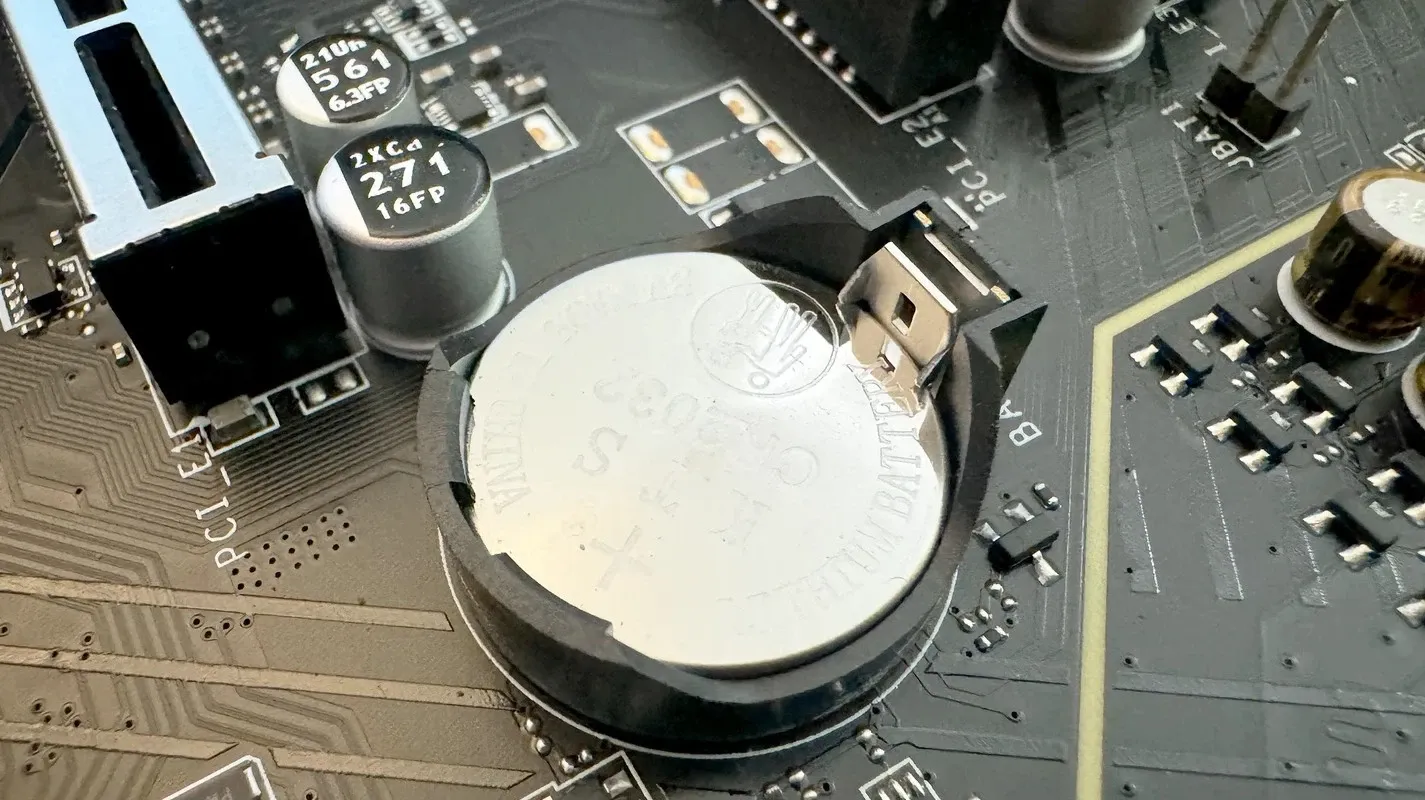
2. Locate CMOS jumper motherboard (usually near CMOS battery, labeled "CLR_CMOS" sau "JBAT1")
3. Default position: Pins 1-2 connected, Move jumper Pins 2-3 pentru 10 sec
4. Return jumper Pins 1-2 original position
5. Reconnect PSU, boot → BIOS defaults restored

Method 2 - CMOS Clear Button (Premium Boards):
• High-end motherboards (ASUS ROG, MSI MPG) = dedicated button back I/O panel labeled "CMOS" sau "CLR"
• Press button 5-10 sec (PC powered OFF!) = instant clear

Method 3 - Battery Removal (Last Resort):
1. Shutdown PC, disconnect PSU
2. Remove CMOS battery CR2032 (silver coin cell) motherboard
3. Wait 5-10 min (discharge residual capacitors)
4. Reinsert battery, boot → Defaults restored
ATENȚIE: Some modern boards (2020+) store BIOS settings flash memory = battery removal NOT sufficient clear, MUST use jumper/button method!

⚠️ După Clear CMOS:
• Boot → "CMOS Settings Wrong" sau "Please enter Setup to configure" message normal
• Enter BIOS (DEL/F2), configure essentials: Boot priority (SSD first), XMP enable (dacă RAM overclock stable proven), date/time set, Save & Exit
• First boot slower (hardware re-detection, training RAM timings fresh)

Întrebări Frecvente

⚠️ Este riscantă actualizarea de BIOS?
DA - risc EXISTENT, DAR minimizat proceduri corecte!

Risc principal: Power loss mid-flash = "Brick" motherboard!
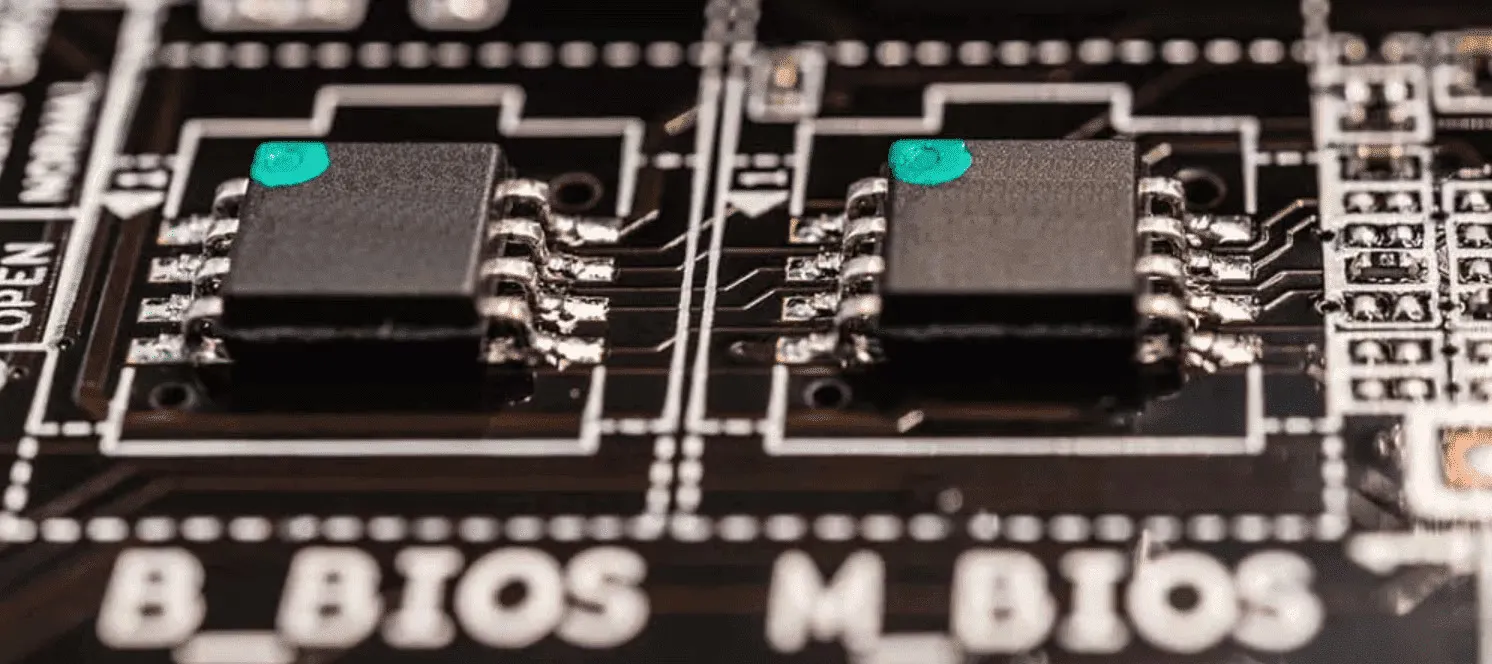
• Flashing BIOS = scrierea firmware chip EEPROM motherboard (proces 3-8 min duration)
• Dacă power interruption (electricity blackout, PSU failure, user accident unplug) MID-FLASH = corruption partial firmware = motherboard DEAD (nu mai bootează, zero POST, brick complet!)
• Recovery: BIOS chip replacement (hardware service 200-400 RON) SAU dual-BIOS boards (premium feature Gigabyte/ASUS = backup chip automatic recovery), majority budget boards = single BIOS = brick catastrophic!

Cum ELIMINĂM risc nostru:

1. UPS (Uninterruptible Power Supply) mandatory:
• Connect PC la UPS battery backup = guaranteed power 10-15 min minimum (suficient 5x duration flash 3-8 min)
• Electricity blackout mid-flash = UPS seamless switch battery = zero interruption = safe completion
• Cost UPS: 300-600 RON investment (APC Back-UPS 650VA = 400 RON) = insurance against brick 500-1500 RON motherboard replacement!

2. Checksum verification file integrity:
• Download BIOS file site producător → Verify MD5/SHA256 checksum (hash unique file)
• Manufacturer provides checksum: "B550F13.bin - MD5: a3f5c8..."
• Calculate checksum downloaded file (certutil Windows CMD: `certutil -hashfile B550F13.bin MD5`)
• Match perfect = file intact zero corruption download, Mismatch = re-download mandatory (corrupted file flash = brick guaranteed!)

3. Read release notes + community feedback:
• Manufacturer release notes: "Known issues: occasional boot delay +10 sec" = warning flag consider skip version
• Forums/Reddit search: "[Motherboard] BIOS [version]" = users report "bricked my board!" frequent = avoid version dangerous, Reports positive "stable, RAM OC improved" = confidence higher proceed

4. NEVER update BIOS dacă current version stable zero issues!
• Golden rule: "If it ain't broke, don't fix it!" = risc update unjustified când system funcționează perfect
• Update DOAR când: new CPU compatibility needed, critical bug affects you, security patch necessary, feature enable required (TPM 2.0)

Statistici realist risc:
• Success rate BIOS updates (proper procedure + UPS): 99.5%+ (extremely safe când precauții luate)
• Brick rate (no UPS + rushed procedure): 0.5-2% (rare DAR devastating când occurs!)
• Recovery options brick: Dual-BIOS auto-recovery (premium boards), USB BIOS Flashback (support varies), BIOS chip replacement service (200-400 RON)

Serviciu nostru garanție: UPS-protected flash + checksum verified + recovery tools available = risc minimized extreme, 1000+ BIOS updates performed zero bricks record!
🔐 Am uitat parola de la BIOS. O puteți reseta?
Desktop: DA - Clear CMOS reset parola instant (99% boards)!

Procedură desktop:
1. Shutdown PC, disconnect PSU power cable
2. Open case, locate CMOS jumper motherboard (labeled "CLR_CMOS" near battery)
3. Move jumper pins 1-2 → pins 2-3 pentru 10 sec (short circuit CMOS memory)
4. Return jumper original position pins 1-2
5. Reconnect PSU, boot → BIOS password CLEARED, enter BIOS free (no password prompt)
• Time: 5-10 min total
• Cost: 0 RON (DIY free) sau serviciu nostru 100 RON (convenience + verification settings restore optimal)

Laptop: COMPLICAT - password stored security chip encrypted!

De ce laptopuri diferit?
• Business laptops (Dell Latitude, HP EliteBook, Lenovo ThinkPad) = BIOS password security feature anti-theft (prevent unauthorized boot/access)
• Password stored dedicated security chip (TPM SAU separate EEPROM encrypted) = Clear CMOS battery removal NU afectează password (by design security!)

Soluții laptop password forgotten:

1. Manufacturer unlock code (official method):
• Contact Dell/HP/Lenovo support, provide: Serial number laptop (label bottom), Proof of ownership (invoice/receipt original purchase), Photo ID owner
• Support generates master unlock code unique laptop serial = bypass password one-time
• Success rate: 80-90% (dacă ownership proven legitimate), Time: 3-7 zile business (support ticket process), Cost: Usually FREE (warranty support) SAU 50-100 EUR fee (out-of-warranty)

2. EEPROM chip programming (hardware method):
• Locate BIOS/EEPROM chip motherboard laptop (25-series SPI flash chip, ex: 25Q64)
• Use CH341A programmer USB (hardware tool 50-100 RON AliExpress) + SOIC-8 clip connect chip in-circuit
• Read chip dump binary file, edit hex remove password section, write back chip
• Success rate: 70-85% (risc: incorrect edit = brick, chip damage soldering heat), Time: 1-2h (experienced tech), Cost serviciu: 200-300 RON (risc involved + equipment specialized)

3. BIOS chip replacement (last resort):
• Order replacement BIOS chip pre-programmed eBay/AliExpress (search "[Laptop model] BIOS chip"), typical 80-150 RON + shipping 2-4 săptămâni China
• Desolder old chip, solder new chip (requires hot air rework station + soldering skills advanced)
• Success rate: 90%+ (dacă chip correct + soldering proper), Cost total: 200-400 RON (chip + labor service)

⚠️ Alternative AVOID (scams/risky):
• "BIOS password generator online" websites = 95% fake (generic algorithms NOT work modern laptops), waste time zero results
• "Master password backdoor" claims = urban legend majority models (manufacturers patched vulnerabilities 2015+)

Recomandare noastră:
• Desktop = Clear CMOS DIY easy SAU serviciu 100 RON trivial
• Laptop consumer (non-business) = password often simple Clear CMOS works some models (try first!)
• Laptop business = contact manufacturer official unlock (safest legal), hardware methods (last resort risky)
🤔 De ce aș face update dacă calculatorul merge bine?
Răspuns scurt: NU trebuie, DACĂ totul funcționează perfect!

Golden rule BIOS updates: "If it ain't broke, don't fix it!"

Update justified DOAR când:

1. CPU upgrade compatibility (MANDATORY):
• Motherboard B550 + Ryzen 3600 current → Upgrade Ryzen 5800X3D planned
• Check support list: 5800X3D requires BIOS F13+ (AGESA microcode newer)
• WITHOUT update = CPU nou no POST (PC pornește DAR zero display, beep codes CPU not supported)
• Action: Update BIOS F13+ ÎNAINTE install CPU nou = compatibility guaranteed

2. Windows 11 install blocked (TPM 2.0 necessary):
• Windows 11 requirements: TPM 2.0 + Secure Boot mandatory (Microsoft policy)
• Motherboard ARE TPM 2.0 hardware (fTPM AMD) DAR BIOS older versions NU expun setting enable
• Update BIOS latest → Advanced settings → AMD fTPM option appears = enable → Windows 11 install proceeds

3. Documented bug affects you specific:
• Example: RAM DDR4 3600 MHz XMP profile = training fails, boots 2133 MHz default slow
• Forums confirm: Bug known BIOS F10, fixed F12 release notes "Improved memory training"
• Update F10→F12 = targeted bug fix = XMP stable = performance restored

4. Security vulnerability disclosed critical:
• AMD Zenbleed, Intel Downfall, etc. = hardware vulnerabilities public exploits
• Manufacturers release BIOS microcode patches = mitigation necessary
• Update = protection exploits potential = peace of mind security

5. Feature nou necesită enable:
• Resizable BAR (ReBAR) gaming performance +5-15% FPS (requires BIOS + GPU driver support)
• Older BIOS versions NU au ReBAR option = update adds feature menu BIOS

NU update pentru:
• "Just because new version exists" = curiosity NOT valid reason (risc unjustified!)
• "Maybe performance boost?" = placebo, gains minimal 1-3% typical (except RAM specific improvements AGESA)
• "Bored, want fiddle settings" = dangerous mindset, entertainment altceva NOT BIOS flashing!

Risc vs reward:
• Risc update: 0.5-2% chance brick (power loss, file corrupted, bug introduced new version)
• Reward update: 0-5% performance improvement (unless specific issue solved)
• Verdict: Update justified DOAR când specific need identified, otherwise stable system = DON'T TOUCH!
💰 Cât costă serviciul update/resetare BIOS?
Manoperă update BIOS: 150 RON
• Verificare versiune current (enter BIOS, note version)
• Download latest stable site producător (verify checksum)
• Prepare USB flash FAT32 (extract BIOS file)
• UPS connect PC (backup power protection)
• Flash BIOS procedure (Q-Flash/EZ Flash 3-8 min)
• Reboot verify version nou (POST check)
• Optimizare settings (XMP, TPM 2.0, Secure Boot, fan curves, boot priority)
• Windows boot test stability (15 min monitoring)
• Timp: 45-60 min total

Manoperă Clear CMOS (resetare setări): 100 RON
• Open case access motherboard
• Locate CMOS jumper/button
• Clear procedure (jumper move 10 sec SAU button press)
• Reboot verify defaults restored
• Configure essentials (boot priority, XMP enable dacă stable, date/time)
• Timp: 15-30 min

Servicii suplimentare (combo):
• Update BIOS + Optimizare overclocking RAM: +50 RON (manual tuning timings, stress test stability Memtest86 2h)
• Update BIOS + CPU installation simultan: +100 RON manoperă CPU (combo discount vs separate 200 RON CPU service)

Garanție: Manoperă 30 zile (dacă probleme POST/boot/instability din cauză setări = revenire FREE re-configure), hardware motherboard garanție producător (zero afectare warranty update BIOS official firmware).
⏱️ Cât durează update BIOS?
Update BIOS simple: 30-45 min
• Verificare version + download: 10 min (site producător, checksum verify)
• Prepare USB flash: 5 min (format FAT32, extract file)
• Flash procedure: 3-8 min (variază motherboard model, file size 8-32 MB typical)
• Auto-reboot + RAM training: 2-5 min (first boot slower re-detection hardware)
• Settings configure: 10 min (XMP, TPM, Secure Boot, fans, boot order)
• Windows boot test: 10 min (stability verify, Device Manager check)
• Total: 30-45 min

Update BIOS + optimizare advanced: 1-1.5h
• Steps above: 30-45 min
+ RAM overclock manual tuning: 20-30 min (timings adjust, voltage tweak, Memtest86 quick pass)
+ Fan curves custom profiling: 10 min (quiet idle <40°C, ramp gradual, max load 100%)
• Total: 1-1.5h

Clear CMOS simple: 15-20 min
• Open case: 5 min
• Clear procedure: 2 min (jumper move SAU button press)
• Reboot + configure essentials: 10 min (boot priority, XMP, date/time)
• Total: 15-20 min

Program livrare:
Aceeași zi: Aduci PC 9-10 AM → Finalizare 11-12 PM → Ridicare aceeași zi!
Urgență express (+50 RON): Priority treatment, update + basic config 30 min (skip advanced tuning)

📍 Zone Deservite

Update BIOS la domiciliu în toate zonele București și Ilfov

Update BIOS safe sau Clear CMOS necesară?

UPS protected + Checksum verified + Optimizare setări în 45-60 min

✓ UPS protected | ✓ Checksum verified | ✓ Settings optimized